Controlling Someone Else's Sonos, Without an Account
The speakers are right there, the Wi-Fi password is on the fridge, and changing the music still means asking somebody. Guest Mode in Lyd controls a Sonos system on the network you are on, with no account, no password exchange, and nothing added to the owner's system. It is a real answer for a rental or a party, and it is deliberately narrower than the app you would use at home.
7 min read
A Sonos system belongs to an account. The owner signs in, the app talks to the system through that account, and anyone who wants to control the speakers is expected to be signed in as well. That arrangement works right up to the moment somebody who lives somewhere else wants to skip a track.
Sonos has an answer for this, and it is worth starting there, because it is the thing Guest Mode depends on.
Sonos Guest Access: What the Sonos App Already Does
Sonos ships a setting called Guest Access, and it is on by default. In the Sonos app it sits under Account → Privacy & Security → Connection Security → Guest Access, and Sonos describes it plainly: with it on, “devices connected to the same WiFi network as your Sonos system can control playback, volume, and grouping as guests without access to administrative features.”
That sentence is the whole mechanism. A Sonos system answers control commands from devices on its own network, and the account is not part of that transaction. Two things follow.
Nobody has to hand over a password. A guest who is on the Wi-Fi already has as much control as the setting allows, and adding, removing or reconfiguring speakers is not part of it.
The host can switch it off. With Guest Access off, no app on the network can control the system without an account, and that includes Lyd. If you can see the speakers but no controller can find them, that setting is the first thing to check.
What Guest Access does not change is the app in the guest’s hand. It is a property of the system, not a mode in the app, so a guest still installs the full Sonos app and then navigates a house they have never seen.
Switching to Guest Mode on iPhone and iPad
Guest Mode stops using your Sonos account for as long as it is on, finds the speakers on the Wi-Fi you are connected to, and talks to them directly on the local network.
On iPhone and iPad
- Join the same Wi-Fi network as the speakers. Guest Mode has no way to reach a system you are not on the network with.
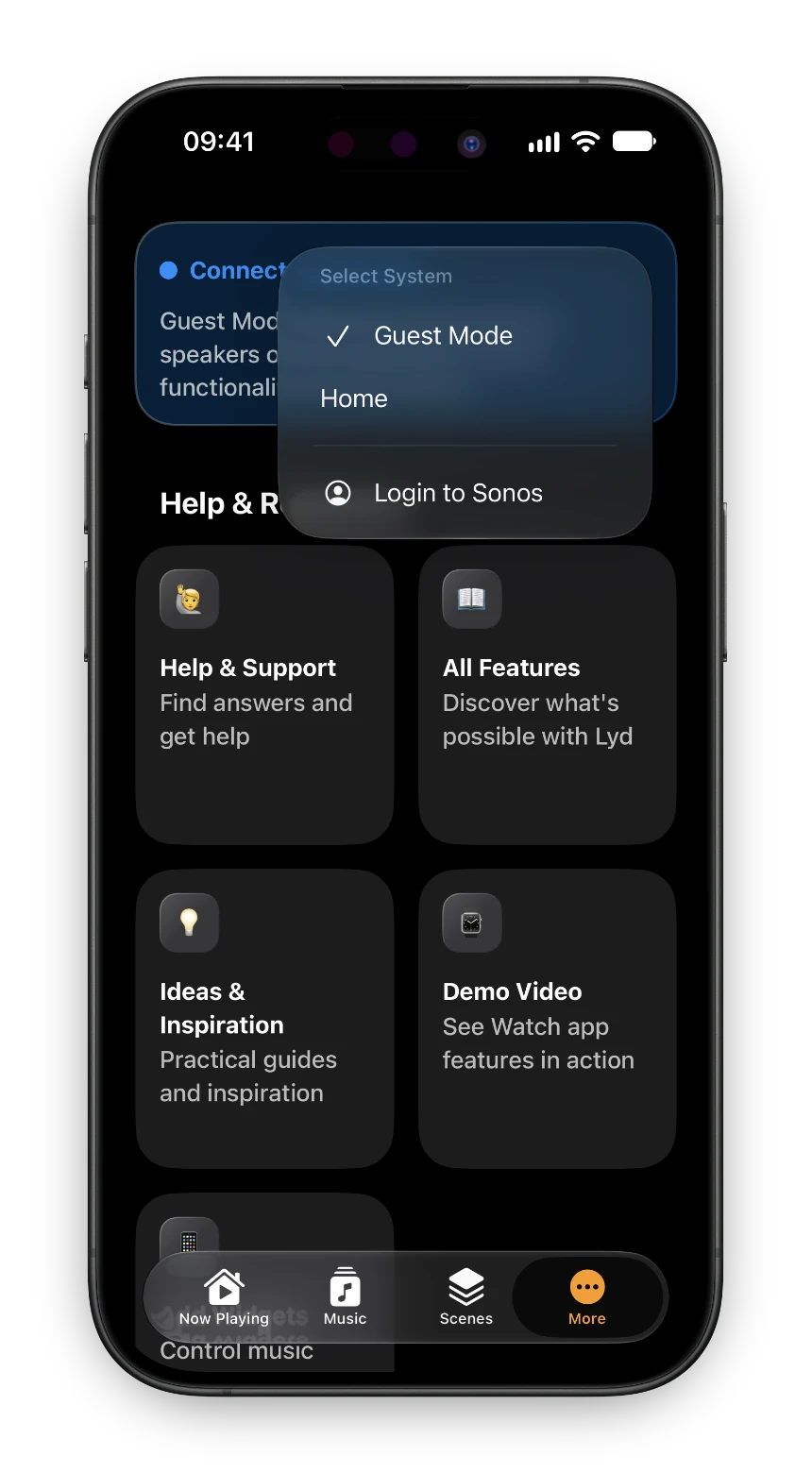
- Open Lyd and go to the More tab. The status card at the top reads "Connected to Sonos"; on iPad the same control is the pill in the toolbar.
- Tap the ••• button on it and choose "Guest Mode" from the list of systems.
- Allow Lyd to access your local network when iOS asks. Nothing is discovered without that permission, and the prompt appears the moment you tap.
- The card turns blue and reads "Connected as Guest". The rooms in the house appear, and you are controlling them.
If you have no Sonos account at all, there is a shorter way in: the welcome screen offers Use Guest Mode below the login button. Lyd asks you to confirm first, because most people are better served by signing in, and then goes straight to the local speakers.
Guest Mode on Apple Watch
It works on the Watch, with one condition attached.
On Apple Watch
- Scroll to the bottom of the room list and tap "More options".
- Tap "Select system".
- Turn the "Guest mode" toggle on. Lyd explains what it does, and your own systems below the toggle gray out while it is on.
- Go back. The rooms on the local network are now the rooms you see.

Sonos on Your Apple Watch
Sonos makes no Apple Watch app. Lyd has had one since 2019: rooms, volume on the Digital Crown, Sonos Favorites and grouping, with the phone left wherever it is.
Read the GuideWhat a Guest Can and Can’t Do
Guest Mode is narrower than being signed in, and the app says so on the card you just switched on: “Some functionality may be limited.” The line falls in a specific place.
| Works as a guest | Needs the owner’s Sonos account |
|---|---|
| Play and pause | Skipping to the next or previous track |
| Volume and mute, for the group and per speaker | Sonos Favorites and Sonos Playlists |
| Seeking within the current track | Browsing and searching streaming services |
| Grouping and ungrouping rooms | A Music Library on a NAS or Mac |
| Seeing what is playing, with artwork | Shuffle, repeat, and crossfade |
| Clearing the queue | Sleep Timer |
| Battery level on a Move or Roam | Voice Messages from the Watch |
| Line-in and TV inputs, home theater options | |
| The playback position readout |
Put plainly: play, pause, seek, set the volume of the whole group or one speaker, and group or ungroup rooms. Choosing what to play needs the owner’s Sonos account. Streaming services, Sonos Favorites and Sonos Playlists all live behind that account, and in Guest Mode there is none to fetch them from, so Lyd hides those buttons instead of letting you press them into a wall. What plays is whatever the system is already playing, or whatever the owner starts.
That is worth knowing before you plan an evening around it. If you want your own audio on someone’s speakers, AirPlay to a single speaker does that job and Guest Mode does not compete with it; they solve different halves of the problem, and you can use both in the same room.
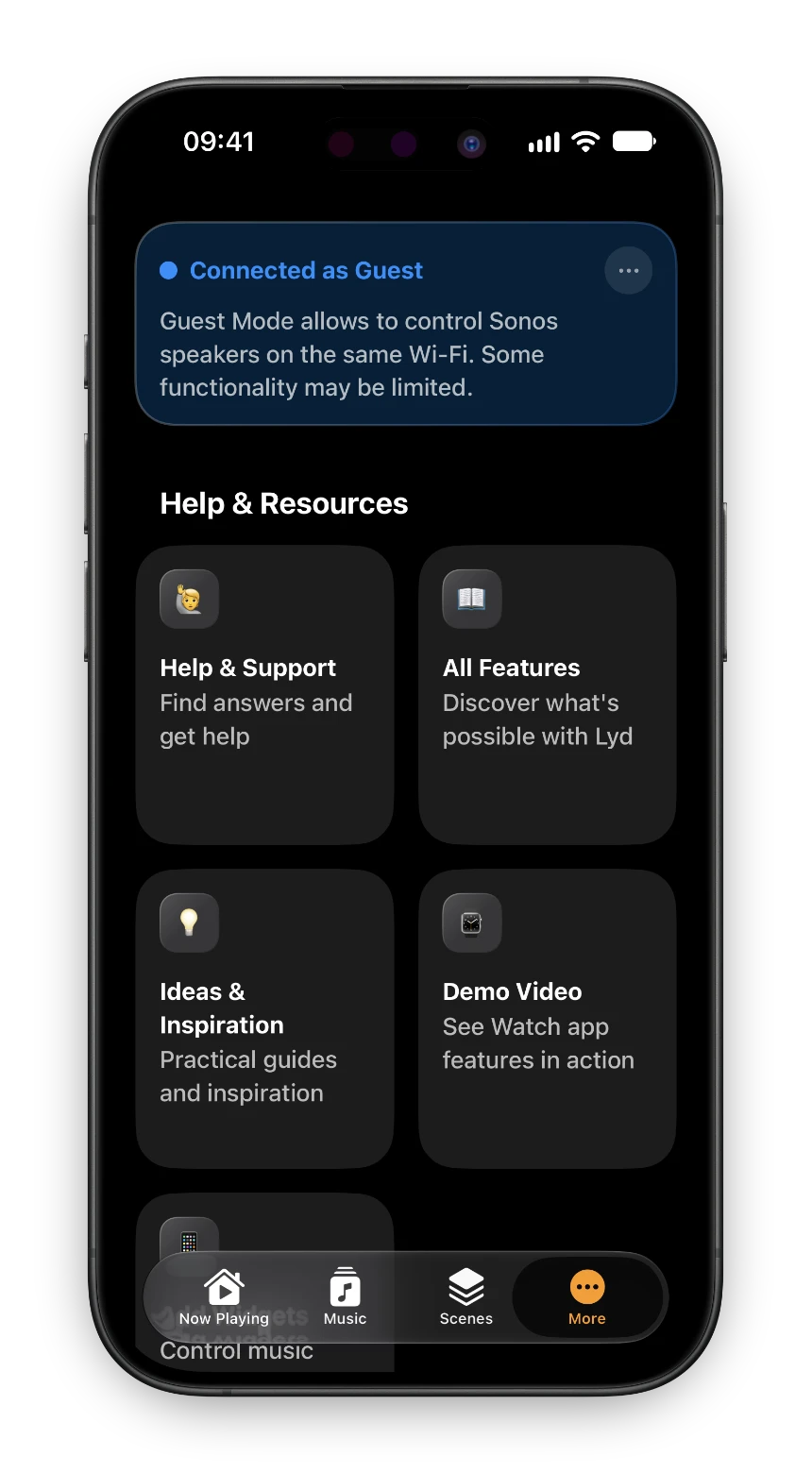
Guest Mode talks to the speakers over your local network and does not use the Sonos cloud or your Sonos account. Two things still go out over the internet: cover art and radio-station logos are looked up online, and the app’s own analytics keep running. And because control is local, Guest Mode reaches only the speakers on the network you are on. Controlling a system from somewhere else takes your own account.
And if the system in front of you is yours, sign in rather than staying a guest. Lyd’s own confirmation says the same thing: Guest Mode is for the case where the speakers belong to somebody else.
Switching Back to Your Own System
Open the same menu and pick your own Sonos system. The card turns green, reads “Connected to Sonos” again, and your Favorites, services and Watch features come back with it. On the Watch, turn the “Guest mode” toggle off.
There is nothing to revoke afterwards. Guest Mode never added you to the owner’s account, never stored their credentials, and never asked them to approve anything, so leaving is just a switch back rather than a cleanup.
Where This Comes Up
Vacation Rentals
The Wi-Fi password is on the fridge and the Sonos is in the living room. Join the network, switch to Guest Mode, and you can turn the terrace down at midnight without a message to the host. Nothing passes between you and a stranger, and nothing about your stay stays behind on their account.
Visiting Friends
A weekend is a long time to keep asking someone else to turn the music down. Switch once when you arrive, switch back when you leave. Your own system is one tap away the whole time.
Dinner Parties
The host puts something on. Everyone else can skip a track, pull the kitchen into the group, or drop the volume in the room they are actually sitting in, from their own phone, instead of routing every request through whoever owns the speakers.
Before You Arrive
Two minutes at home saves the awkward version of this. Install Lyd, switch to Guest Mode once on your own network, and grant the local network permission while you have the patience for a system prompt. After that, the whole thing at somebody else’s house is: join the Wi-Fi, tap Guest Mode, play.
Lyd is a one-time purchase with no subscription, and the 14-day trial needs no signup. Available on the App Store for iPhone, iPad, and Apple Watch.

