Automate Your Sonos System with Apple Shortcuts
An automation is a trigger plus an action. Your iPhone supplies the triggers (an alarm, a place, an app opening, a tap on a sticker) and your Sonos system supplies the speakers. This guide covers what Apple's Shortcuts app can do with Sonos today, which actions the official app and Lyd each bring to it, and four automations worth building tonight.
10 min read
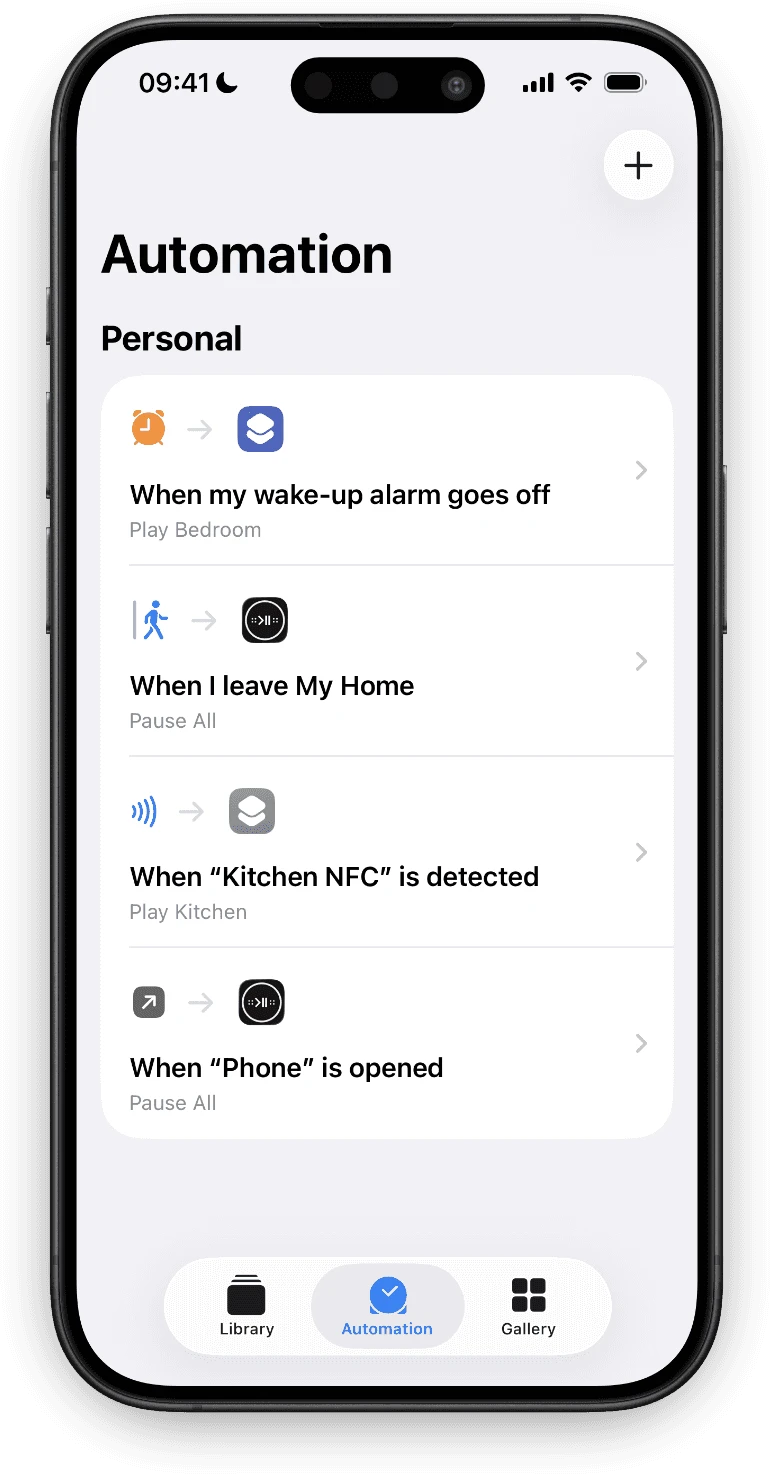
The music you want is almost never a decision. It is the same room, at the same time, for the same reason. The kitchen at seven. Everything off when you leave. Silence when the phone rings.
Doing that by hand means unlocking a phone, finding an app, waiting for it to reach your system and then tapping the thing you already knew you wanted. Automation is how you stop doing it by hand.
Sonos Apple Shortcuts: What You Can Build Today
Apple’s Shortcuts app has two halves, and they do different jobs.
- A shortcut is a list of actions you can run yourself: from the Shortcuts app, from a Home Screen icon, from the Share sheet, or by saying its name to Siri.
- An automation is a trigger attached to a shortcut. The Automation tab is where you choose the trigger.
The triggers are the reason to automate a stereo from a phone at all. An iPhone can start a shortcut when an alarm goes off or is stopped, when you arrive at or leave a place, when a specific app opens or closes, when you hold the phone to an NFC sticker, when a Focus turns on, when you connect to CarPlay or a particular Wi-Fi network, or at a time of day. A Mac has time of day and little else, which is why the interesting Sonos automations all live on the phone.
What none of that does on its own is talk to Sonos. For that, the trigger needs an action, and actions come from apps.
Sonos Shortcuts in the Official App
The Sonos app has its own actions now, and it is worth knowing exactly which ones before adding anything else. Sonos shipped six in June 2026: Play Content, Create Group, Ungroup, Play/Pause, Set Mute and Set Volume. A September update added Night Sound and Speech Enhancement for home theater products.
That covers a real set of automations. Start a playlist in a room at 7am, group two speakers when you get home, drop the volume when a Focus turns on. If that is all you need, you need nothing else.
Two things they do not do. They are primitives, so anything involving several rooms at different volumes has to be spelled out action by action, and it breaks the day you rename a room. And there is no way to stop everything at once: with no “pause all” action, silencing a house means one Play/Pause per group, and you have to know which groups exist.
The rest of the official app is still worth keeping either way. It is the only way to set a system up, add a speaker or run Trueplay, and it remains the better place to browse a large library.
| Feature | Sonos app official | Lyd third-party |
|---|---|---|
| Start a favorite or playlist | Yes | Yes |
| Play or pause one room | Yes | Yes |
| Set a room to an exact volume | Yes | Yes |
| Mute a room | Yes | No |
| Pause every room at once | No | Yes |
| Group and ungroup speakers | Yes | Inside a Scene |
| Home theater settings | Yes | Inside a Scene |
| Restore a whole saved setup | No | Apply Scene |
Every Sonos Shortcuts Action Lyd Adds
Lyd for Sonos adds six actions on iPhone and iPad. Search the action list for “Lyd” and you get:
- Play — start a group you name, or the idle one if there is only one
- Pause Selection — pause a group you name
- Pause All — stop every group in the system, with no room to name
- Play Music — start a Sonos Favorite or a Sonos Playlist in a group, with a Shuffle switch
- Set Volume — put a group at an exact level, 0 to 100
- Apply Scene — restore a whole saved setup in one step, covered further down
Four of them take a room: Play, Pause Selection, Play Music and Set Volume each have a Group field you fill in while building the shortcut. Pause All takes nothing at all, which is what makes it the reliable one in an automation.
None of the six opens the app to do its work. The shortcut runs, the speakers react, and Lyd stays closed.
What is missing is worth saying too. There is no skip, no seek, no queue, and no way to create a Scene from a shortcut. Skipping and nudging the volume live on the Apple Watch instead, as spoken commands.
Every action checks your license before it runs, so the trial has to be active or the one-time unlock bought. There is no signup and no subscription either way.
Four Sonos Automation Recipes
Each of these is one trigger and one action. Build them in the Automation tab of Apple’s Shortcuts app: tap +, choose the trigger, choose Run Immediately, then add the Lyd action.
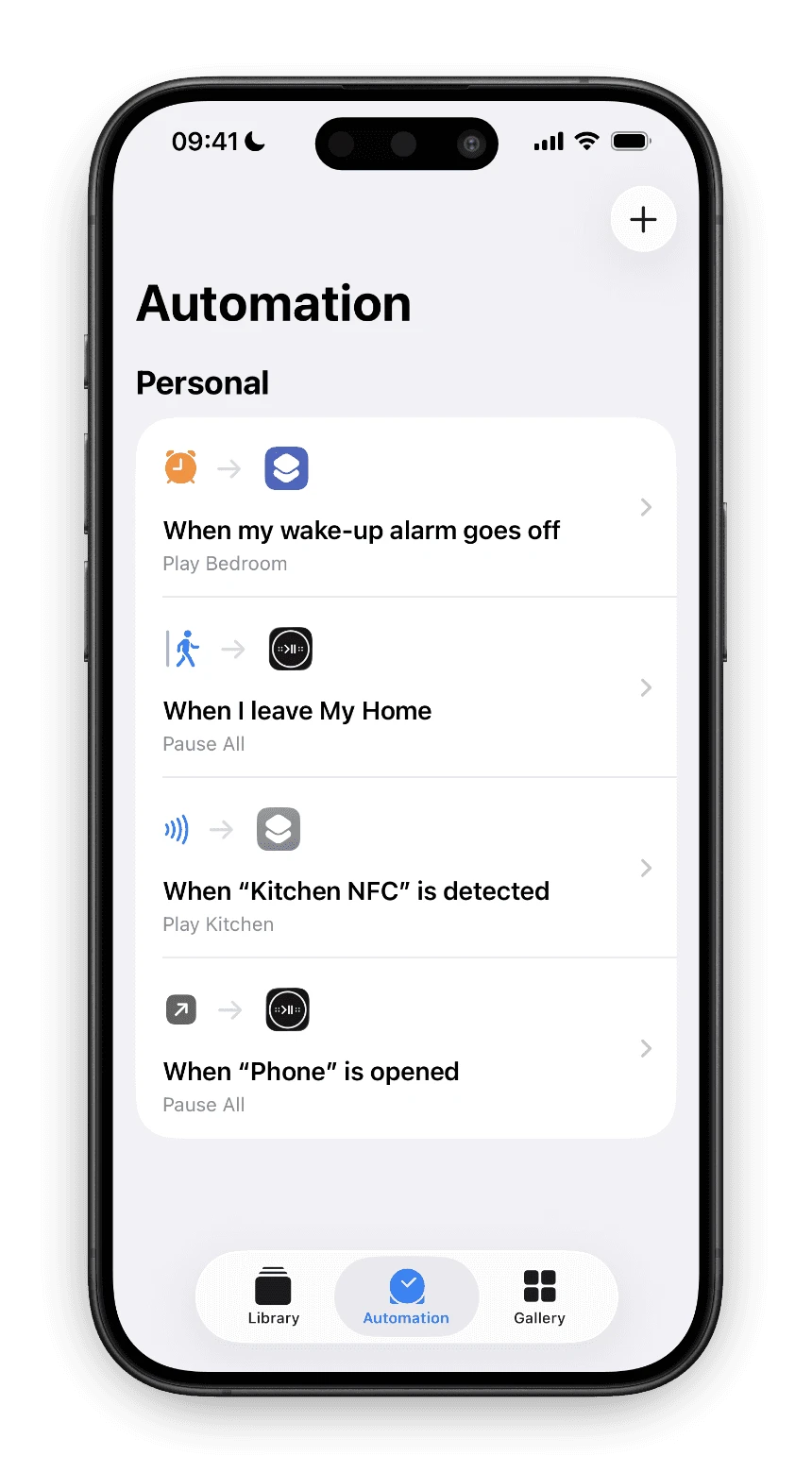
Silence the House When a Call Starts
The oldest annoyance in the list: the phone rings and the kitchen is loud.
Pause everything when the Phone app opens
- In Shortcuts, open the Automation tab and tap +
- Choose App, pick Phone, and set it to When Opened
- Choose Run Immediately and turn Notify When Run off
- Add Lyd's Pause All action and tap Done
Pause All is the right action here because it needs no room and no guesswork. Incoming or outgoing, every group stops.
Wake Up to a Room, Not a Buzzer
Sonos has its own alarms, and Lyd can edit them from the Apple Watch, but they run on their own schedule and know nothing about the alarm that actually gets you out of bed.
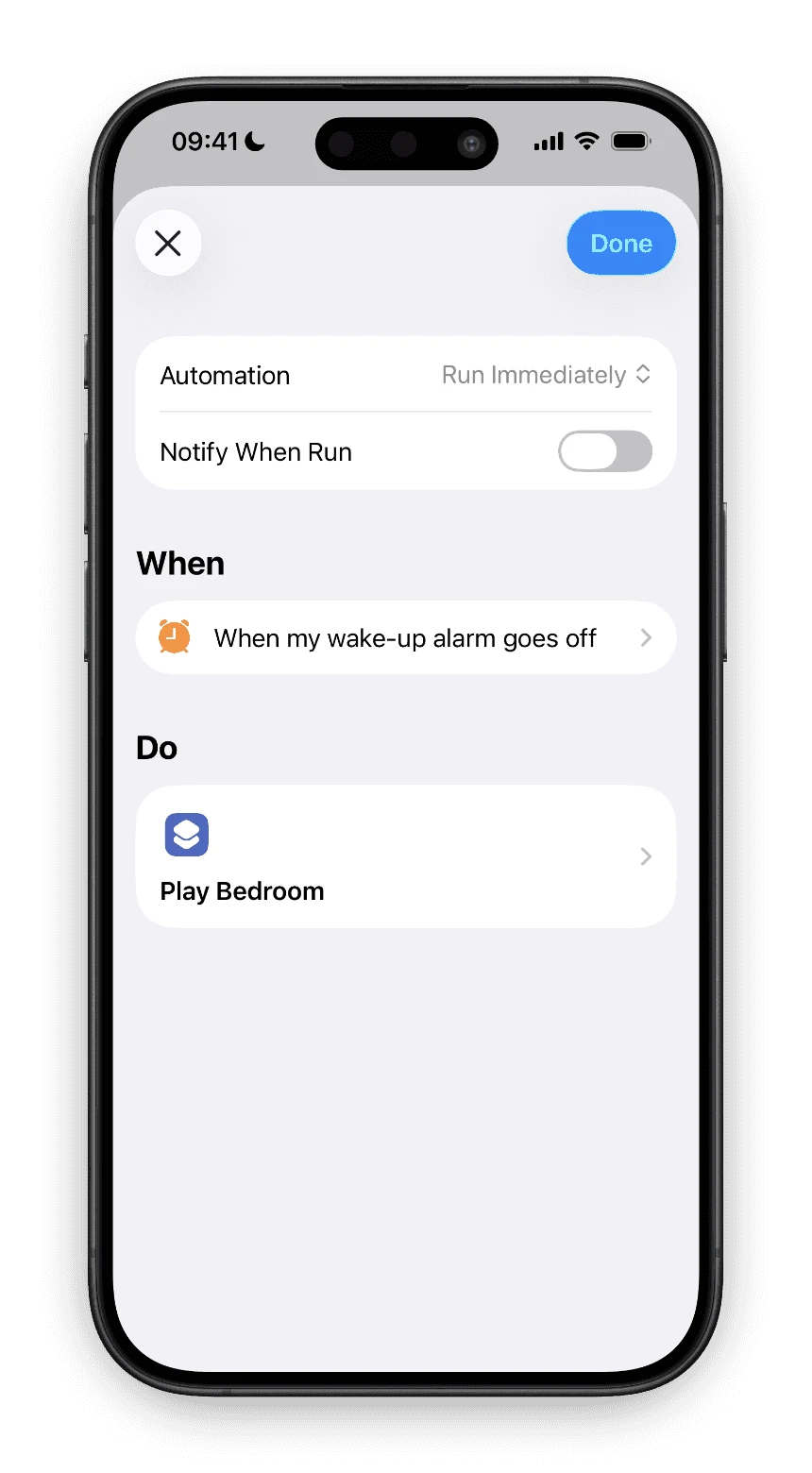
Play the bedroom when your alarm goes off
- In the Automation tab, tap + and choose Alarm
- Pick your wake-up alarm and choose Is Stopped (or Is Snoozed, if you want it on the second attempt)
- Add Lyd's Play Music action
- Set Group to the bedroom and Music to the Favorite or Sonos Playlist you want, then choose whether to shuffle it
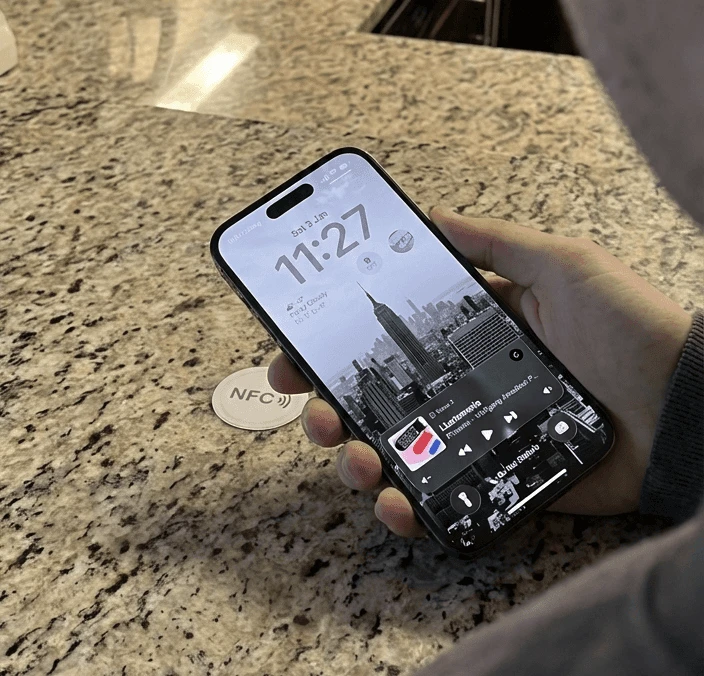
Tap an NFC Sticker to Start the Kitchen
NFC stickers cost a few cents each and stick to anything. One under a kitchen cabinet turns “I want music while I cook” into a gesture.
Start music from an NFC sticker
- Stick the tag somewhere you will pass, at hand height
- In the Automation tab, tap + and choose NFC, then Scan and hold the top of your iPhone to the tag
- Give the tag a name you will recognize later, such as Kitchen
- Add Lyd's Play Music action, set Group to the kitchen and pick the music
Pause the House When You Leave
Music playing to an empty house is the one that costs you something, and you only find out hours later.
Pause all speakers when you leave home
- In the Automation tab, tap + and choose Arrive or Leave
- Set the location to Home and choose Leave
- Choose Run Immediately
- Add Lyd's Pause All action
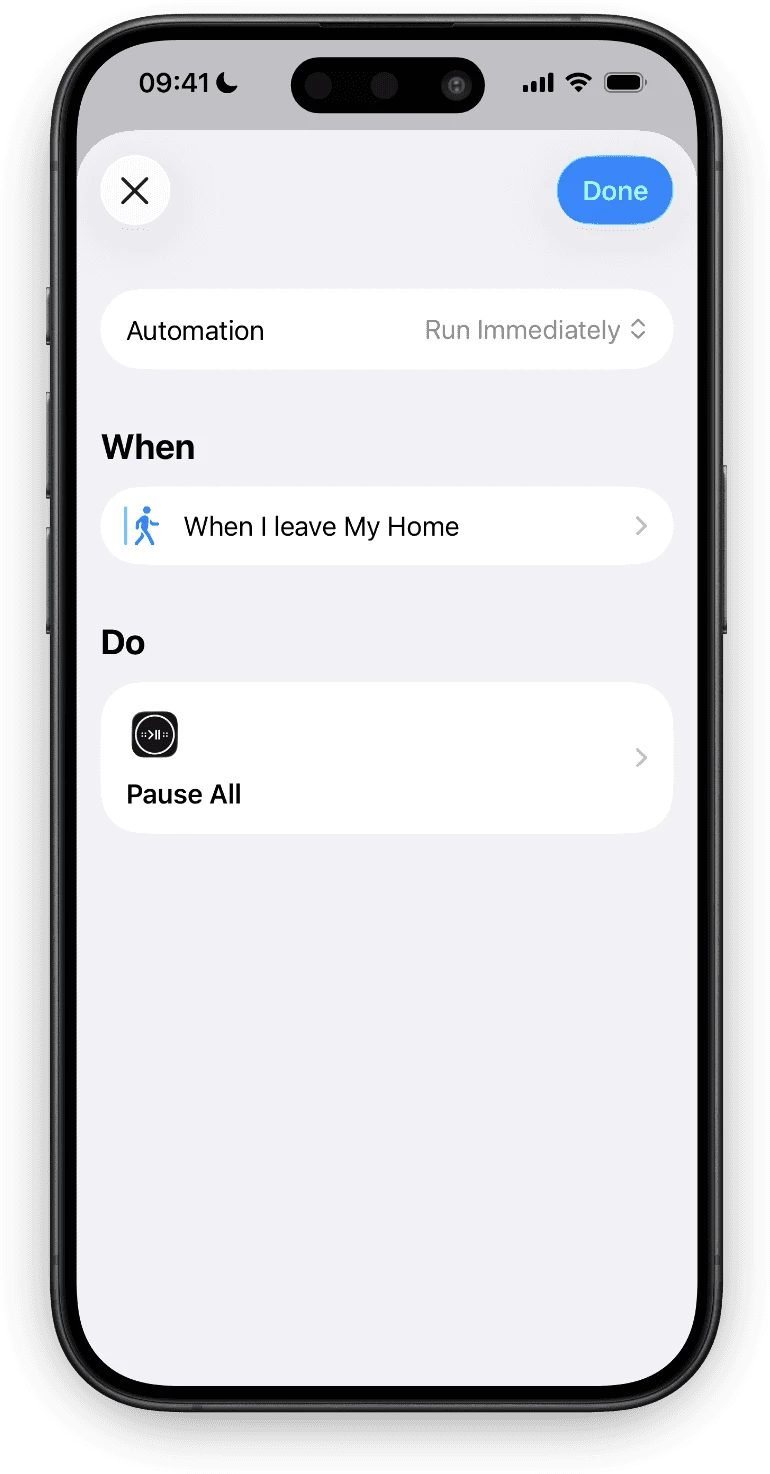
Location triggers are the one place to leave Notify When Run switched on for the first week. Geofences fire when iOS decides you have really left, which is not always the moment you close the door, and the notification tells you whether it behaved.

Sonos Widgets and Live Activities on iPhone
The official Sonos app keeps every control inside the app. Lyd puts play, skip and volume on the Home Screen, on the Lock Screen and in the Dynamic Island.
Read the GuideOne Action for a Whole Setup: Apply Scene
Most of a real listening setup is not one action. Dinner is three rooms grouped, each at its own level, one playlist, and the rest of the house quiet. Spelled out in Shortcuts that is a dozen steps, and renaming a room breaks it.
A Scene is that setup saved. You build it in Lyd, on the iPhone or iPad, and it stores which speakers play and how they are grouped, which one leads the group, each speaker’s own volume, EQ, home theater settings such as Night Sound and Speech Enhancement, what plays, and whether it shuffles. Three switches decide what applying it does beyond restoring the arrangement: start playing, stop every speaker that is not part of the Scene, and pause the Scene’s own speakers after a set time.
In Shortcuts that whole thing is one action. Add Apply Scene, pick the Scene from the list, done. When your taste changes you edit the Scene in Lyd and every automation that fires it follows, because the shortcut stores the Scene’s identity rather than its name.
Sonos iOS Shortcuts and Siri, Hands Free
Every shortcut you build can be run by voice with no extra work. Siri runs a shortcut by its name, so a shortcut called Dinner answers to “Hey Siri, Dinner”. Name them like sentences you would actually say and the voice half of this is finished.
Lyd also registers phrases of its own, so a few things work before you have built anything:
- “Play music with Lyd”
- “Pause all with Lyd”
- “Select playlist with Lyd”
- “Set volume with Lyd”
- “Apply Dinner with Lyd”, naming any Scene you have saved
On an Apple Watch, Lyd brings a set of its own: pause, next, previous, louder, quieter, grouping and Apply Scene, all spoken. That is where an automation you want to override tends to catch you anyway: hands wet, phone in another room.

Sonos on Your Apple Watch
Sonos makes no Apple Watch app. Lyd has had one since 2019: rooms, volume on the Digital Crown, Sonos Favorites and grouping, with the phone left wherever it is.
Read the GuideWhat Can Go Wrong
Five things worth knowing before you build a morning routine on this.
- An automation that asks a question will not run. This is the Group field again. Anything unattended needs the room named.
- A Scene belongs to one Sonos system. Apply one against a different household and it stops with “That scene belongs to a different Sonos system.” rather than doing something surprising to the wrong house.
- Speakers have to be there. A Scene applies as long as at least half of a group’s speakers answer. Below that it stops rather than assembling a partial group.
- A locked iPhone will ask before it acts. iOS puts its own authentication gate in front of app actions on a locked device, and an app cannot waive it. An automation that fires while the phone is locked can stop and wait for Face ID rather than running straight through.
- Commands go through Sonos, not through your phone. Control runs primarily over the Sonos cloud API, so an automation is as fast as your connection and it needs one. That is also why it works when you are nowhere near the speakers.
Where to Start
Build the Phone one first. It takes ninety seconds, it pays for itself the first time someone calls, and it tells you whether the rest of this is worth your evening.
Lyd for Sonos is a one-time purchase with no subscription, and a 14-day free trial with no signup. Download it on the App Store and go pick a trigger.

